
Author: krishnaale

Google Reviews Disappearing July 2026

Google Reviews Disappearing July 2026

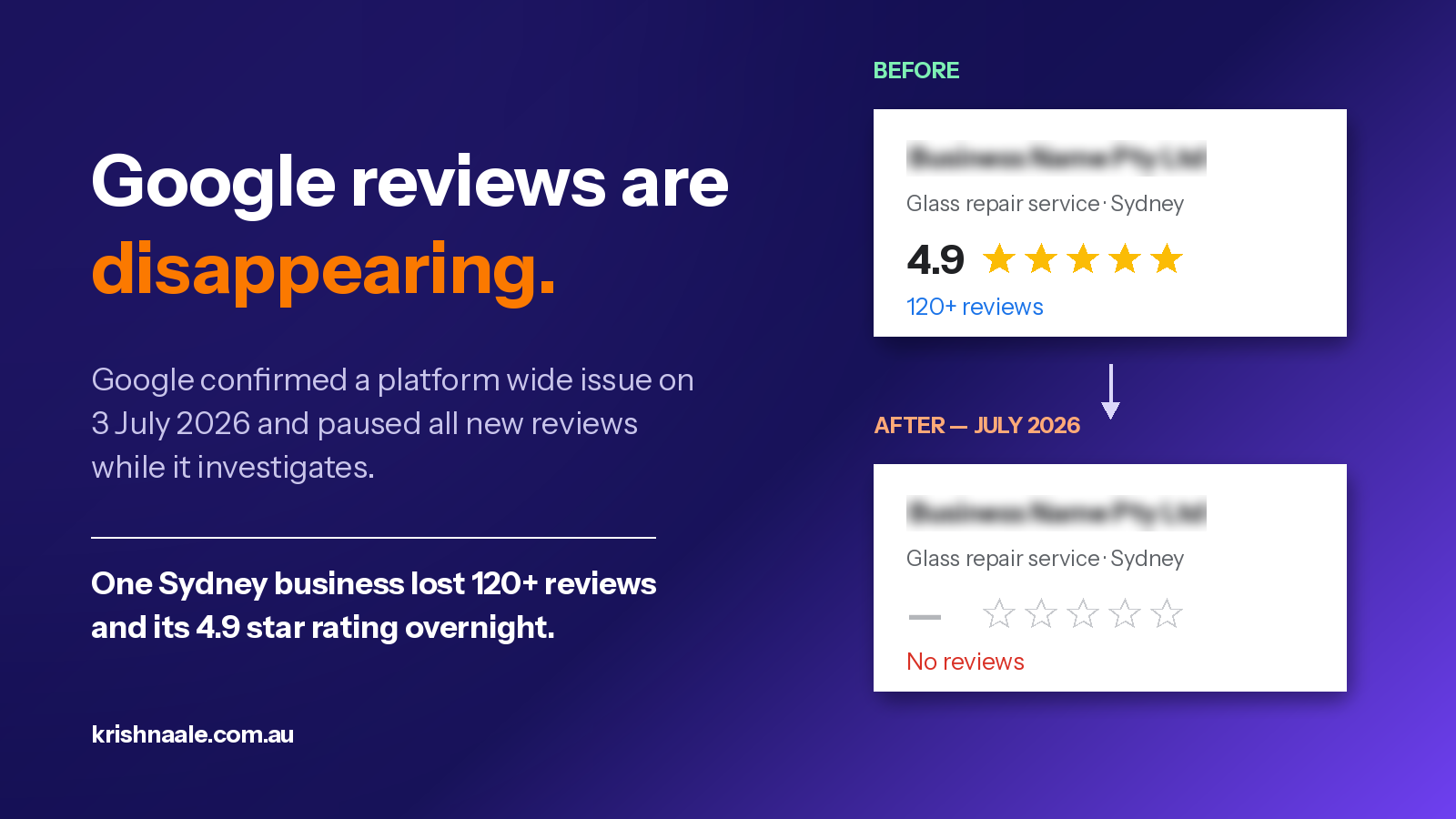
Yesterday I opened a client’s Google Business Profile and something was very wrong. This is a Sydney based local service business with a 4.9 star rating built from more than 120 genuine customer reviews, collected steadily over years of trading. Every single one of them was gone. No star rating next to the business name, no review count, nothing. The Reviews button was still sitting there in the knowledge panel, but behind it was an empty profile.

If you manage a local business or look after clients who depend on their Google presence, and you have noticed the same thing this week, take a breath before you panic. This is not a penalty against your business, and in most cases the reviews are not permanently deleted. Here is what is actually going on.

What is happening with Google reviews right now?

On 3 July 2026, Google confirmed it is investigating widespread reports of reviews vanishing from Google Business Profiles. Barry Schwartz reported the issue on Search Engine Land after businesses and local SEO professionals filed dozens of complaints about disappearing reviews, sudden drops in review counts, and hidden reviews. As part of the same incident, Google has temporarily paused the ability for profiles to receive new reviews while it works through the problem.

Google’s own statement points to its automated spam detection systems. When those systems flag activity as suspicious, Google can remove reviews in bulk and pause reviews on a profile to prevent further abuse. Importantly, Google has also said it will restore any reviews that were incorrectly removed. That last part matters a great deal, because it tells us the reviews still exist in Google’s database. They have been pulled from display, not erased.

Has this happened before?

Yes, and knowing the history is the best reason to stay calm. In October 2025, thousands of businesses reported sudden drops in review counts, and Google later acknowledged a bug affecting how reviews displayed on Business Profiles. In February 2026 another large wave hit. Data from the reputation platform Partoo showed around 4.3 million reviews disappearing globally in mid February, with roughly 3.8 million of them restored after Google’s verification process ran its course. In early March 2026, over 2 million reviews vanished from Partoo client listings alone and were fully reinstated within the week.

The pattern is consistent. Google’s moderation now works in batches. It pulls large groups of reviews for reassessment, then reinstates the ones its systems validate as genuine. Legitimate reviews from real customers overwhelmingly come back. The reviews that stay gone are typically the ones that breach policy, such as incentivised reviews, reviews from employees, or coordinated bursts that look like manipulation.

Why is Google doing this?

Regulatory pressure is a big part of the answer. Rules against fake reviews have tightened significantly, including FTC action in the United States and the Digital Services Act in Europe, and Google is responding by moderating user generated content far more aggressively, including with AI powered filtering. The side effect is volatility. When enforcement thresholds tighten, clusters of perfectly legitimate reviews can get swept up in the reassessment because they superficially resemble patterns the system is hunting for.

In my client’s case, all 120 plus reviews disappearing at the same moment is actually the reassuring version of this problem. A policy action against specific reviews removes some and leaves others. A whole profile going to zero overnight, during a confirmed platform wide incident, points squarely at batch reprocessing or a display sync issue.

What should local businesses do right now?

First, document everything. Screenshot your profile as it looks today with the missing reviews, and dig up any older screenshots, reports or exports that show your previous rating and review count. If your reviews do not return on their own, that evidence makes a reinstatement case much faster to prove.

Second, do not send out review request campaigns while this is unfolding. New reviews are paused anyway, and a sudden burst of review activity the moment the pause lifts is exactly the kind of pattern that trips spam filters. Keep asking customers for feedback through your normal channels, just spread it out and keep it personal.

Third, give it a few days before escalating. In previous waves, most reviews reappeared on their own within days as Google’s verification completed. If nothing has returned after roughly a week, contact Google Business Profile support through the Reviews Management Tool. Explain that all reviews disappeared simultaneously in early July, that you have not breached review policies, and reference the confirmed platform wide incident. Businesses affected by earlier waves who took this exact route had their legitimate reviews reinstated within days of Google’s final response.

Finally, treat this as a reminder not to build your entire reputation on a platform you do not control. Reviews on Trustpilot, Facebook and industry directories, plus testimonials published on your own website, keep your social proof intact when Google has a bad week. My client’s website carries its rating and customer feedback on its own pages, which means prospective customers searching for the business this week still see the trust signals, even while the Google profile shows nothing.

The bottom line

If your Google reviews vanished in the first few days of July 2026, you are caught in a confirmed, global Google incident, not a punishment. The historical record from October 2025 through March 2026 shows that the overwhelming majority of genuine reviews come back. Document what you had, sit tight for a few days, escalate through the proper channel if needed, and use the scare as motivation to diversify where your reputation lives.

If you are dealing with this on your own profile or a client’s and want a second set of eyes, feel free to reach out through the contact page.

GEO Explained: How AI Search Is Changing SEO

GEO Explained: How AI Search Is Changing SEO

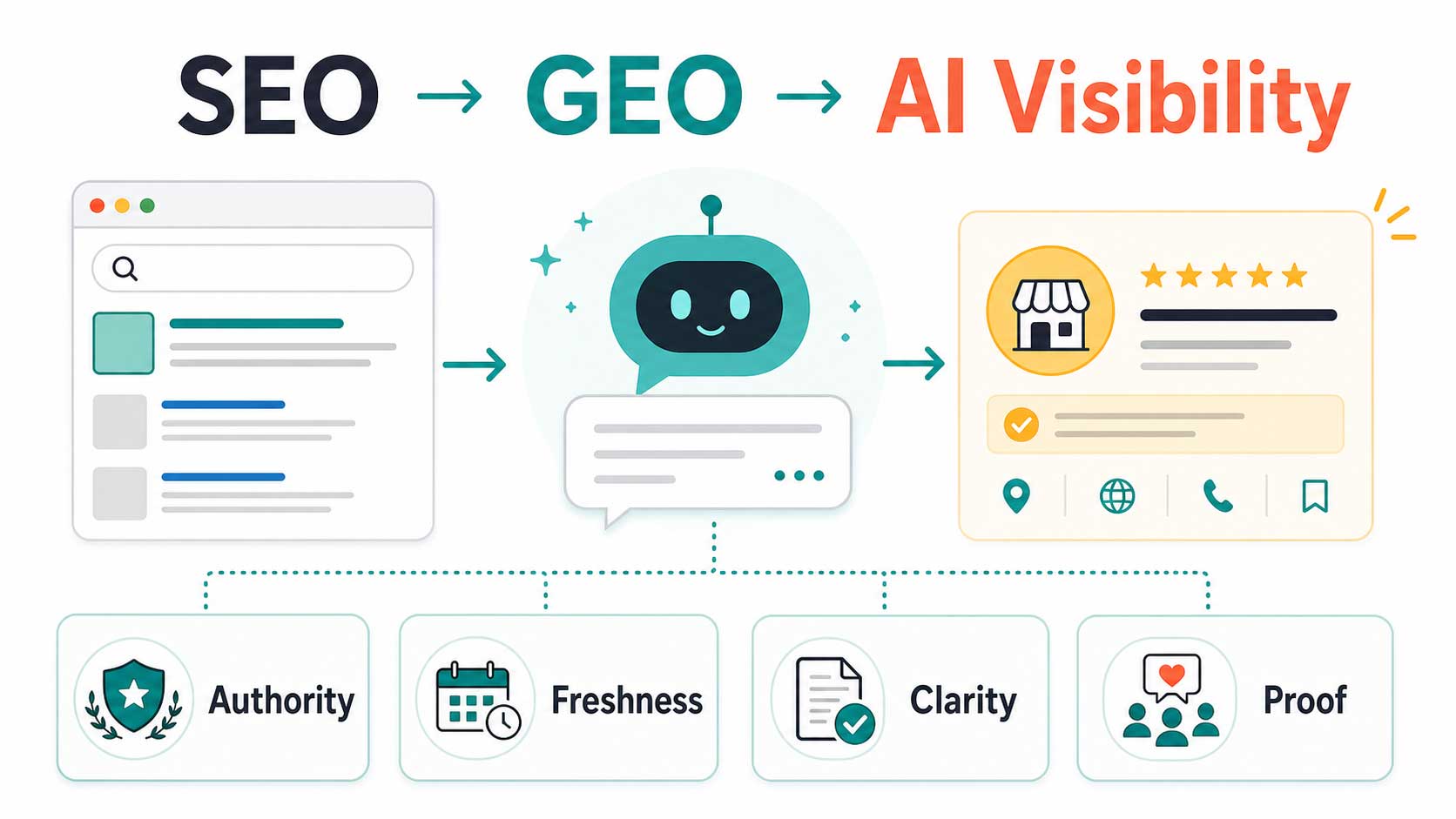
If I were teaching this to a junior SEO, I would start with this: SEO is no longer only about ranking on Google. It is now also about being understood, trusted and recommended by AI tools like ChatGPT, Perplexity, Gemini and Google AI Overviews.

That is where GEO comes in. GEO stands for Generative Engine Optimisation. It means improving your brand’s visibility inside AI-generated answers, not just traditional search results.

The Simple Shift: From Search Results To AI Answers

In the old search journey, someone typed a query into Google, scanned the results, clicked a few websites, compared options and made a decision.

In the new search journey, many users ask an AI tool a full question, such as: “Who is the best plumber near me for blocked drains?” or “Which accounting firm is best for small businesses in Sydney?” The AI then gives a short list of recommendations.

That means the user may never visit ten websites. They may only trust the answer given by the AI.

Why This Matters

This is not a small trend. Google says AI Overviews are available in more than 200 countries and over 40 languages. SparkToro’s 2024 zero-click study found that 58.5% of US Google searches ended without a click. Bain & Company also reported that many consumers now rely on AI summaries and zero-click results regularly.

So the lesson for a junior SEO is simple: traffic is not the only metric anymore. Visibility inside AI answers is becoming a serious part of digital marketing.

What Is GEO?

GEO, or Generative Engine Optimisation, is the process of making your business easier for AI systems to understand, trust, cite and recommend.

Traditional SEO asks: “Can this page rank?” GEO asks: “Can an AI confidently recommend this business as a trusted answer?”

SEO Vs GEO: What Is The Difference?

SEOGEO
Focuses on Google rankingsFocuses on AI recommendations
Optimises website pagesOptimises your wider online presence
Tracks clicks and trafficTracks mentions, citations and AI visibility
Backlinks are a major signalBrand mentions, reviews and third-party proof matter heavily

The Four Signals AI Looks For

1. Authority

AI wants to know whether other trusted sources mention you. This includes industry websites, directories, news articles, podcasts, guest posts, forums and client websites.

If your business only exists on your own website, AI has limited proof that others trust you.

2. Freshness

AI systems favour current information. A website last updated two years ago looks less reliable than one with recent content, new reviews, updated service pages and active social profiles.

Freshness does not mean publishing every day. It means showing consistent signs that the business is active.

3. Clarity

AI needs to clearly understand who you are, what you do, where you operate and who you help.

For example, “We help businesses grow” is too vague. “We help local plumbing companies in Melbourne generate blocked drain leads through SEO and Google Business Profile optimisation” is much clearer.

4. Proof

Proof includes reviews, testimonials, case studies, ratings and real customer feedback. AI uses these signals to understand whether people actually trust the business.

This is why review velocity matters. A steady flow of recent reviews is stronger than a large number of old reviews with no recent activity.

How To Audit A Business For GEO

If I gave this task to a junior SEO, I would ask them to do this simple audit:

  • Search the brand name in ChatGPT and Perplexity.
  • Ask: “Who are the best [service] businesses in [location]?”
  • Check whether the business appears in the answer.
  • Check whether competitors appear instead.
  • Search the business name on Google and review third-party mentions.
  • Check Google Business Profile, directories, reviews and social profiles for consistency.
  • Look for outdated pages, old statistics and missing schema markup.

What Businesses Should Do First

Step 1: Fix Entity Clarity

Make the business name, address, phone number, website URL and description consistent everywhere. This includes Google Business Profile, Bing Places, Apple Maps, Facebook, LinkedIn, directories and industry listings.

Step 2: Write A Clear Business Description

Create one canonical description that explains what the business does, who it helps, where it operates and why it is credible.

Example:

Example Plumbing is a Melbourne-based plumbing company specialising in blocked drains, emergency plumbing and CCTV drain inspections. The team works with homeowners, landlords and small businesses that need fast, licensed plumbing support. Example Plumbing is known for same-day service, upfront pricing and practical repair advice. The business has served Melbourne customers since 2012.

Step 3: Publish Helpful Content

Write content that answers real customer questions directly. AI is more likely to use content that is clear, specific and easy to extract.

Good content topics include:

  • How much does this service cost?
  • What causes this problem?
  • How do I choose the right provider?
  • What is the difference between option A and option B?
  • When should I call a professional?

Step 4: Build Third-Party Mentions

Do not rely only on your own website. Try to earn mentions from local directories, industry blogs, suppliers, partners, podcasts, newsletters and client case studies.

A mention does not always need to be a backlink. If a credible website names your business in the right context, that can still help AI understand your authority.

Step 5: Keep Reviews Moving

Ask happy clients for reviews every month. Respond to every review. Turn strong testimonials into case studies. Spread reviews across relevant platforms instead of relying only on one place.

A Simple Monthly GEO Checklist

  • Publish one useful article, guide, FAQ or case study.
  • Update one old page with fresh information.
  • Post once per week on the main social platform.
  • Ask two customers for reviews.
  • Respond to all new reviews.
  • Earn or request one third-party mention.
  • Check ChatGPT and Perplexity visibility once per month.

The Biggest Mistake To Avoid

The biggest mistake is treating GEO like a trick. It is not about stuffing keywords into content for AI. It is about making the business genuinely easier to verify.

AI needs clear information, recent activity, trusted mentions and real proof. If those signals are missing, even a good business can be invisible.

Final Takeaway

SEO is not dead. But SEO by itself is no longer enough.

The businesses that win in AI search will be the ones that are clearly described, consistently listed, actively reviewed, regularly updated and mentioned by credible third parties.

If you are teaching a junior SEO, teach them this simple rule: Google rankings show where a page sits. GEO shows whether AI trusts the business enough to recommend it.

Exporting Outlook Emails

How to export emails from outlook

Understanding how to export emails from Outlook can be helpful when it comes to effective email management. Whether you’re transferring to a new email service provider, backing up your data, or decluttering your online area, this comprehensive tutorial will provide you with the tools to export emails with ease. Let’s get started and streamline your Outlook experience even further.
  1. Start the process by clicking File on the left top tab. outlook export
  2. Click on Open & Export. outlook open export
  3. Click Import/Export. Click Import/Export
  4. Now a window will pop up like the one below, click Export to a file. Export to a file
  5. Now select Outlook Data File(.pst). outlook data pst
  6. Select the email address that you wanna export. select-your-email
  7. Click Browse if you want to save the file in your preferred location, leave the rest as it is, and hit Finish. save pst file
Crazy domains inode

Crazy Domain 100,000 inodes

In the world of web hosting, finding the right provider and package can make all the difference in the success of your website. While Crazy Domain’s 100,000 inodes package may seem appealing, it’s essential to understand its limitations. In this article, we’ll explore why 100,000 inodes can fall short for your hosting needs and recommend alternative providers like VentraIP and SiteGround that offer superior performance and flexibility. Let’s delve deeper into these options.

Understanding the Inode Limitation: Crazy Domain’s 100,000 inodes package may initially appear generous, but for websites with growing storage and dynamic content requirements, it can quickly become a hindrance. Inodes, as mentioned earlier, are data structures that store information about files and directories. The more files and directories you have, the more inodes you consume. While 100,000 inodes may be sufficient for small-scale websites, larger and more resource-intensive platforms often demand higher limits to accommodate their needs.

VentraIP: Scalability and Reliability: When it comes to scalability and reliability, VentraIP stands out as a top contender. With a range of hosting plans, including shared, virtual private servers (VPS), and dedicated servers, VentraIP offers generous inode limits that far exceed the constraints of Crazy Domain. Their hosting solutions provide the flexibility and room to grow as your website expands, ensuring uninterrupted performance even during traffic spikes.

SiteGround: Optimal Performance and Robust Features: SiteGround is another reputable hosting provider that boasts exceptional performance and a rich set of features. With their cutting-edge infrastructure, SiteGround ensures lightning-fast loading times and superb user experience. While Crazy Domain’s 100,000 inodes can hinder your website’s speed and functionality, SiteGround offers ample inode limits and advanced caching technologies to enhance performance. Moreover, SiteGround’s hosting packages come bundled with features like free SSL certificates, daily backups, and top-notch security measures to safeguard your website’s data.

Why Look Beyond Crazy Domain: While Crazy Domain’s 100,000 inodes package may have its merits, it’s crucial to consider the long-term needs of your website. As your online presence grows, so do your storage requirements and the complexity of your website. Opting for hosting providers like VentraIP and SiteGround, which offer higher inode limits, ensures your website can continue to expand without facing limitations and potential disruptions.

Conclusion: While Crazy Domain’s 100,000 inodes package may seem enticing at first glance, it may not be the best fit for websites with ambitious growth plans. To truly unleash the potential of your website, consider alternative providers like VentraIP and SiteGround that offer superior scalability, performance, and features. Don’t let inode limitations hold you back. Explore the hosting solutions offered by VentraIP and SiteGround to embark on a seamless online journey that can accommodate your evolving needs and aspirations.

Why Digital marketing?

Why digital marketing is important?

Digital marketing is one of the most important tools that businesses can use to reach their target audiences. In a world where more and more people are using the internet to find information and make purchase decisions, it’s essential for businesses to have a strong digital marketing strategy. There are many benefits of digital marketing, including :Reach: Digital marketing allows you to reach a large audience through various online channels, including search engines, social media, email, and websites. This makes it possible to target specific groups of people based on demographics, interests, and behaviors.Cost-effectiveness: Digital marketing is often more cost effective than traditional marketing methods, as it enables you to reach a large audience without having to incur the high costs associated with print, television, or radio advertising.Measurable results: With digital marketing, it’s easier to measure the success of your campaigns and make data-driven decisions. You can track website traffic, conversions, and other important metrics in real-time, and adjust your strategies accordingly.Engagement: Digital marketing provides opportunities for two-way communication between businesses and their customers. This allows companies to build relationships, gather feedback, and provide support to customers through channels such as social media and email.Increased brand awareness: Digital marketing helps increase brand awareness by allowing businesses to reach a wider audience and promote their products and services online. This can lead to increased customer loyalty, as well as improved brand recognition and credibility.Overall, digital marketing is a crucial component of modern business strategy, as it enables companies to reach and engage with customers in new and effective ways.
Google my business listing

How to create and optimize Google My Business

Google My Business (GMB) is a free tool that helps businesses to manage their online presence across Google, including search and maps. This powerful tool is essential for businesses that want to increase their visibility to local customers and improve their local SEO rankings. In this article, we will explore why a GMB profile is crucial for your business and how you can use it to your advantage.Creating a GMB profile is quick and easy. You simply need to sign up and provide Google with the necessary information about your business, including your business name, address, phone number, and website URL.Here’s how you can create a Google My Business profile:
  1. Go to the Google My Business website (https://www.google.com/business/).
  2. Click the “Start now” button and sign in to your Google account, or create a new one if you don’t already have one.
  3. Enter your business name and address. If your business already exists in Google’s database, it will appear as a suggestion. If not, you can add your business manually.
  4. Verify your business information. Google will send a verification postcard to your business address with a code that you’ll need to enter online. This helps Google confirm that you are the owner of the business and that your information is accurate.
  5. Fill out your profile. Once your business is verified, you can add additional information such as your business hours, contact information, and website URL. You can also upload photos of your business, which will appear on Google Maps and in search results.
  6. Monitor and respond to customer reviews. Encourage your customers to leave reviews on your Google My Business profile, and respond to both positive and negative reviews in a professional and timely manner.
  7. Keep your information up-to-date. Regularly check your profile for accuracy and make updates as necessary.
By following these steps, you’ll be well on your way to creating a comprehensive Google My Business profile that can help you reach new customers and improve your online presence.Once you have created your profile, it’s important to keep it up-to-date and optimized. You can do this by:
  • Adding photos and videos to showcase your business
  • Responding to customer reviews to show that you value their feedback
  • Updating your business information, including hours of operation, to ensure that customers have the most accurate information
  • Adding keywords to your profile to help customers find your business more easily

Final Thoughts

Google My Business is a powerful tool that can help you to improve your local SEO rankings and increase your visibility to potential customers. By creating and optimizing your GMB profile, you can ensure that your business is appearing in local search results and attracting new customers. So why wait? Start creating your GMB profile today!

Why a GMB Profile is Important for Local SEO?

Google My Business is a vital component of local SEO because it helps Google to understand your business and its location. By providing accurate and up-to-date information about your business, including business hours, contact information, and photos, you can improve your chances of appearing in local search results.Moreover, a GMB profile can help you to rank higher in local search results, making it easier for customers to find your business when they search for products or services in your area. By appearing in local search results, you can increase your visibility to potential customers and drive more traffic to your website.
Web Hosting Services

Best Hosting Company in Australia

Finding the best web hosting in Australia can be a daunting task. With so many options available, it can be difficult to determine which one is right for you. Fortunately, we’re here to help. We’ve taken the time to research and review the best web hosting services in Australia, so you don’t have to. In this article, we’ll discuss the features and benefits of each service and provide our top picks for the best web hosting in Australia.

  1. VentraIP Australia
  2. Siteground
Online ecommerce website

A Guide to Creating an Engaging Online Store

Your online store is the face of your business and can make or break the customer experience. A well-designed ecommerce website not only looks good but also provides an intuitive and seamless shopping experience. Here are some key elements to consider when designing your ecommerce website:
  1. User Experience: The website should be easy to navigate, with a clear and simple layout. Use high-quality images, informative product descriptions and relevant categories to make shopping easier.
  2. Mobile-Responsiveness: With more and more customers shopping on their mobile devices, it’s essential that your website is optimized for smaller screens.
  3. Security: Provide customers with secure payment options and ensure that their personal information is protected. Displaying trust badges such as SSL certificates can help to build trust with your customers.
  4. Speed: A slow website will drive customers away. Optimize your images, reduce the number of plugins and use a fast hosting service to ensure that your website loads quickly.
  5. Branding: Make sure that your brand is consistent across your website and all your marketing materials. Use your brand’s colors, fonts and logo to create a recognizable and memorable experience for your customers.
  6. Call to Action: Encourage customers to take action by using clear and prominent calls to action (CTAs) such as “Add to Cart” or “Buy Now”.
  7. Customer Support: Provide customers with easy access to customer support through live chat, phone or email. Respond promptly to customer inquiries to provide excellent customer service.
By considering these key elements, you can create an ecommerce website that provides an enjoyable and effective shopping experience for your customers.

Web developer be alert of this scam

So I get this message one morning,Here is the job details , I have a small clothing business for both male and female, now am trying to expand the business and i want you to build an eCommerce website for it for advertisement. I need you to checkout this site but I need something more perfect than this if possible, https://violatethedresscode.com/?gclid=EAIaIQobChMI-Jz4m8jS9wIVheDICh0yzwUtEAAYASAAEgIz1fD_BwE The site would only be eCommerce , So i need you to get back to me with an estimate for the web design, The estimate should include hosting and i want thgvvvvvcche site to have not more than 15 pages since it is eCommerce. I have a private project graphic designer, he has the text content, images and the logos for the site.At first I took it as one of normal leads message and replied back with the estimates time frame and the cost but the replied that I get after this made me sure that this was one of those other spam that I got earlier this year.Thanks, I’m very much satisfied with the total estimate, quite affordable . Here’s an exclusive just to show some seriousness and dedication . I am willing to pay up the sum of $1,000 as an upfront payment so that you can start making my website design.I have my credit card available for the payment . But first I want you to pay attention to this .I have been advised to take a long rest for an easy and fast recovery after my ear surgery I went through,hence the reason why I need your favor. I haven’t paid the private graphic designer that has the text content and the logo for my website he does not have credit card facility.Regarding this fact,I will be giving you my credit card for the total of $5,300. Once the funds clears to your account $1,000 will be deducted as an upfront payment for the graphic design,$200 for yourself as tip and the remaining $4,100 will be sent to the private graphic designer that has the text content and the logo for my website.See how they eventually comes to the way scammer does. Comes up excuses and asks for favour, I will pay you but you need to pay someone else. The way this kind of spam works is they have got the credit card information from one of the victim and they pay you with the stolen card details and they will ask to pay to that so called graphic designers through some untraceable payment method, could be remittance, crypto and other sources. And this leads to be seeing your business name in the transaction of the victim and you are seen as a scammer. So web developers don’t fall for this kind of scam. I have seen this kind of scam mentioned by others on many pages. Below are some of the links that explains similar to this topic.https://teamtreehouse.com/community/web-design-scam-heads-uphttps://www.minimist.ca/articles/web-designers-beware-dont-fall-for-this-common-scam