
View my YOOtheme listing YOOtheme
Expert
Skip to main content

Author: Krishna Ale

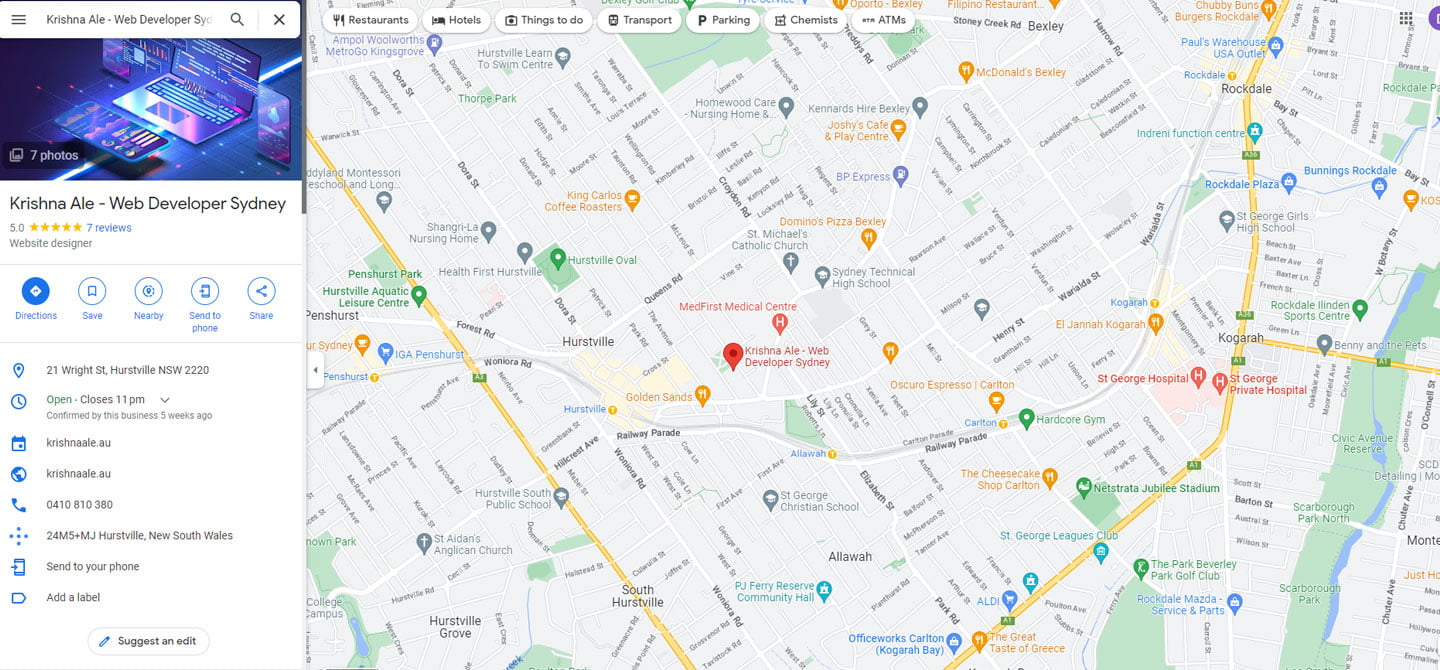
Google my business listing

How to create and optimise Google My Business

Google My Business (GMB) is a free tool that helps businesses to manage their online presence across Google, including search and maps. This powerful tool is essential for businesses that want to increase their visibility to local customers and improve their local SEO rankings. In this article, we will explore why a GMB profile is crucial for your business and how you can use it to your advantage.Creating a GMB profile is quick and easy. You simply need to sign up and provide Google with the necessary information about your business, including your business name, address, phone number, and website URL.Here’s how you can create a Google My Business profile:
  1. Go to the Google My Business website (https://www.google.com/business/).
  2. Click the “Start now” button and sign in to your Google account, or create a new one if you don’t already have one.
  3. Enter your business name and address. If your business already exists in Google’s database, it will appear as a suggestion. If not, you can add your business manually.
  4. Verify your business information. Google will send a verification postcard to your business address with a code that you’ll need to enter online. This helps Google confirm that you are the owner of the business and that your information is accurate.
  5. Fill out your profile. Once your business is verified, you can add additional information such as your business hours, contact information, and website URL. You can also upload photos of your business, which will appear on Google Maps and in search results.
  6. Monitor and respond to customer reviews. Encourage your customers to leave reviews on your Google My Business profile, and respond to both positive and negative reviews in a professional and timely manner.
  7. Keep your information up-to-date. Regularly check your profile for accuracy and make updates as necessary.
By following these steps, you’ll be well on your way to creating a comprehensive Google My Business profile that can help you reach new customers and improve your online presence.Once you have created your profile, it’s important to keep it up-to-date and optimised. You can do this by:
  • Adding photos and videos to showcase your business
  • Responding to customer reviews to show that you value their feedback
  • Updating your business information, including hours of operation, to ensure that customers have the most accurate information
  • Adding keywords to your profile to help customers find your business more easily

Final Thoughts

Google My Business is a powerful tool that can help you to improve your local SEO rankings and increase your visibility to potential customers. By creating and optimising your GMB profile, you can ensure that your business is appearing in local search results and attracting new customers. So why wait? Start creating your GMB profile today!

Why a GMB Profile is Important for Local SEO?

Google My Business is a vital component of local SEO because it helps Google to understand your business and its location. By providing accurate and up-to-date information about your business, including business hours, contact information, and photos, you can improve your chances of appearing in local search results.Moreover, a GMB profile can help you to rank higher in local search results, making it easier for customers to find your business when they search for products or services in your area. By appearing in local search results, you can increase your visibility to potential customers and drive more traffic to your website.

If you would prefer hands-on support, my Google Business Profile service covers setup and optimisation. If your review count suddenly changes, read my guide to Google reviews disappearing before assuming the reviews are permanently lost.


Best Hosting Company in Australia - Web Hosting Services

Best Hosting Company in Australia

Finding the best hosting company in Australia can feel like a big decision, especially with so many providers promising the world. Take a breath – we’ve done the research for you! We compared local options so you can choose a plan that’s reliable, fast, and friendly on your budget, without any of the guesswork.

Whether you’re launching your first blog or moving an established business site, the right host makes a real difference. A good provider keeps your site online, loads pages quickly, and gives you real people to talk to when something goes wrong. Below are our two favourite picks, plus some friendly tips to help you decide.

Our Top Picks for the Best Hosting Company in Australia

  1. VentraIP Australia – An Australian-owned host with local data centres, so pages load quickly for visitors here at home. It’s a great, budget-friendly choice if you’d like support from a local team who understands the Aussie market.
  2. Siteground – A globally trusted host loved for its speedy servers, beginner-friendly dashboard, and round-the-clock customer support whenever you need a hand.

Honourable Mentions

These did not make my top picks, but each is a solid option depending on what you need.

  • Conetix – An Australian owned host based in Queensland, with servers in a Brisbane data centre and a support team in the same country as your site. Its managed WordPress plans include automatic backups with rollback, WordPress Toolkit and security hardening, which suits a business site that nobody is actively babysitting. Support runs on Australian business hours rather than 24/7, so it fits better if your site is not a 3am revenue stream.
  • Digital Pacific – A long running Sydney host with infrastructure in the Equinix SYD5 facility and redundant capacity in Melbourne. It offers local phone support and standard cPanel hosting, which keeps migrations simple if you ever move on. It is now part of a larger international group, so the local ownership story is not what it once was, though the Australian infrastructure and support lines remain.
  • Kinsta – Managed WordPress hosting running on Google Cloud, including the Sydney region, so Australian visitors get local latency on premium infrastructure. Staging, edge caching, daily backups and performance monitoring are built in, and pricing is flat with no renewal jump. Support is chat and ticket only, and pricing starts well above shared hosting, so it earns its place on business sites rather than first blogs.
  • WP Engine – Another managed WordPress platform with a Sydney region available, aimed at agencies and larger sites that need staging, development and production environments. Included tooling such as Smart Plugin Manager and a local development environment saves real time on sites that change often. Confirm the Australian region at signup, because the default provisioning is not always local.
  • Cloudways – A management layer over cloud providers like DigitalOcean and Vultr, including their Sydney regions, so you get cloud performance without running the server yourself. Pricing is pay as you go with no renewal increase, and one server can host multiple WordPress sites without per visit limits. It assumes a bit of technical confidence, and email hosting is not included, so it suits developers more than first time site owners.

How to Choose the Right Host for You

Every website is a little different, so here are a few friendly pointers to help narrow things down:

  • Know your website type – A small blog and a busy online store have very different hosting needs, so start there.
  • Check the support options – Look for live chat or phone support, especially if you’re new to managing a website.
  • Consider loading speed – Faster sites keep visitors happy and can help with search rankings.
  • Compare the plans – Look beyond the price tag to see what’s actually included, such as backups, security, and storage.

What Separates a Good Host From a Cheap One

Everything below comes from hands on comparison, not a press release. I manage multiple hosting accounts across client sites and my own projects, and I have spent years dealing with migrations, outages, support queues and renewal invoices on these platforms. These are the things I check now, learned the slow way.

Most hosting plans look identical on the sales page. The differences show up later, usually on the day something breaks. Three things are worth checking before you hand over your card.

Technical reliability

Server location does most of the heavy lifting for Australian sites. A server in Sydney or Melbourne answers a local visitor in roughly 10 to 30 milliseconds. A server in the US adds 150 to 200 milliseconds to every request before your page even starts loading. You feel it in Core Web Vitals, in the checkout, and in how sluggish the WordPress dashboard feels when you are working.

Then look past the plan name at the platform underneath. Ask which PHP version is current, whether server level caching such as LiteSpeed, NGINX or Varnish is included, and what the actual resource limits are. Plans advertised as unlimited always have caps on CPU, entry processes and inodes. Those caps are what your site hits on a busy day, not the storage number.

Backups deserve a direct question. Find out how often they run, how long they are kept, whether they sit on a separate machine, whether you can restore them yourself, and whether a restore costs anything. Uptime guarantees deserve the same scrutiny. A 99.9% guarantee still allows about 43 minutes of downtime a month, and most of them pay out as a service credit you have to claim.

Support quality

Test support before you commit, not after. Send a pre-sales question that needs a real answer, something like how to raise a PHP memory limit or what happens if a site gets compromised. The reply tells you two things: how long the queue is, and whether first line staff can read an error log and check a slow query, or only reset passwords and escalate.

Check the hours in your own time zone. Overseas 24/7 chat is useful at 2am and less useful when you need someone who understands .au domains, local billing or an Australian payment gateway. Also ask what happens with malware. Some hosts clean an infected site as part of support, others suspend it and sell you a cleanup.

Pricing value

Introductory pricing is the biggest trap in hosting. Renewal rates are commonly two to four times the first term, so compare hosts on the renewal price across two or three years rather than the sign-up offer. Long prepay terms lower the headline rate and raise the cost of leaving.

Add up what sits outside the plan too: SSL certificates, email hosting, migrations, staging, backups and extra sites. Managed WordPress hosts in particular often exclude email entirely and cap visits per month. Finally, confirm you can leave. Full file and database access, and a standard control panel, are what make a future migration a one hour job instead of a rebuild.

We hope this guide to the best hosting company in Australia makes choosing a little easier! Take a look at VentraIP Australia and Siteground above, compare what matters most to you, and pick the host that feels like the right fit for your new website.

Disclosure

No host has paid me to appear on this page, and nobody has been given a spot in exchange for money. Every provider here is one I would recommend to a client, and the order reflects my own testing and years of managing multiple hosting accounts rather than any commercial arrangement.

If you decide one of my top picks is right for you, the two links in that section are my referral links. I may earn a small commission if you sign up through them, at no extra cost to you, and it helps keep this site running. If you would rather not use them, search for the host directly, the recommendation is the same either way. The honourable mentions are plain links with no referral tracking on them.

Hosting is only one part of a reliable website. If you are planning a new WordPress site or a managed migration, see my WordPress development service. You can also read the practical example of how inode limits can restrict a growing website.

Online ecommerce website

A Guide to Creating an Engaging Online Store

Your online store is the face of your business and can make or break the customer experience. A well-designed ecommerce website not only looks good but also provides an intuitive and seamless shopping experience. Here are some key elements to consider when designing your ecommerce website:
  1. User Experience: The website should be easy to navigate, with a clear and simple layout. Use high-quality images, informative product descriptions and relevant categories to make shopping easier.
  2. Mobile-Responsiveness: With more and more customers shopping on their mobile devices, it’s essential that your website is optimised for smaller screens.
  3. Security: Provide customers with secure payment options and ensure that their personal information is protected. Displaying trust badges such as SSL certificates can help to build trust with your customers.
  4. Speed: A slow website will drive customers away. Optimise your images, reduce the number of plugins and use a fast hosting service to ensure that your website loads quickly.
  5. Branding: Make sure that your brand is consistent across your website and all your marketing materials. Use your brand’s colours, fonts and logo to create a recognisable and memorable experience for your customers.
  6. Call to Action: Encourage customers to take action by using clear and prominent calls to action (CTAs) such as “Add to Cart” or “Buy Now”.
  7. Customer Support: Provide customers with easy access to customer support through live chat, phone or email. Respond promptly to customer inquiries to provide excellent customer service.
By considering these key elements, you can create an ecommerce website that provides an enjoyable and effective shopping experience for your customers.

If you need help turning these principles into a working store, explore my ecommerce web development service. For businesses building specifically on Shopify, see my Shopify development service.

Word cloud of scam related terms including fraud, forgery and deception

Web Developer Scam: How the Fake Website Job Works and How to Spot It

One morning I got what looked like a normal website enquiry. A small clothing business wanted an ecommerce site. By the second message it was obvious this was a scam, and it’s one that targets web designers and developers over and over again.

Here’s how it played out, how the scam actually works, and the red flags to watch for so you don’t get caught.

The first message

This is what landed in my inbox (their spelling and grammar, not mine):

Here is the job details, I have a small clothing business for both male and female, now am trying to expand the business and i want you to build an eCommerce website for it for advertisement. I need you to checkout this site but I need something more perfect than this if possible [link to a real clothing store]. The site would only be eCommerce, So i need you to get back to me with an estimate for the web design, The estimate should include hosting and i want the site to have not more than 15 pages since it is eCommerce. I have a private project graphic designer, he has the text content, images and the logos for the site.

It read like plenty of leads I get. A bit rough, but nothing alarming. So I replied with a time frame and a quote.

The reply that gave it away

Thanks, I’m very much satisfied with the total estimate, quite affordable. Here’s an exclusive just to show some seriousness and dedication. I am willing to pay up the sum of $1,000 as an upfront payment so that you can start making my website design. I have my credit card available for the payment. But first I want you to pay attention to this. I have been advised to take a long rest for an easy and fast recovery after my ear surgery I went through, hence the reason why I need your favor. I haven’t paid the private graphic designer that has the text content and the logo for my website, he does not have credit card facility. Regarding this fact, I will be giving you my credit card for the total of $5,300. Once the funds clears to your account $1,000 will be deducted as an upfront payment for the graphic design, $200 for yourself as tip and the remaining $4,100 will be sent to the private graphic designer that has the text content and the logo for my website.

That was it. I’d seen this exact script earlier that year. An excuse, a favour, and “I’ll pay you, but you need to pay someone else.”

How the web developer scam works

  1. A vague job with a decent budget. They point you to someone else’s website and ask for “something like this but better”.
  2. Your quote gets accepted straight away. No questions about scope, no haggling.
  3. A third party appears. Usually a “private graphic designer” or consultant who has the content and logo but can’t take card payments.
  4. They overpay you by card. Then they ask you to forward the difference to that third party by bank transfer, remittance or crypto. Often there’s a “tip” in it for you.
  5. The card is stolen. The real card holder spots the charge and disputes it. The payment gets reversed, sometimes weeks later.

By then the money you forwarded is gone and you can’t get it back. Worse, your business name is on the stolen card’s statement. To the card holder and their bank, you look like the scammer. You can also cop chargeback fees, and your payment provider may freeze or close your account.

Red flags to watch for

  • No business name, ABN, phone number or website of their own
  • A reason they can’t talk on the phone, like surgery, being hearing impaired or travelling
  • They accept your first quote without asking a single question
  • They want to pay more than your quote
  • They ask you to pay a designer, consultant or supplier on their behalf
  • They push you to act fast
  • A free email address and a message that reads like a copy and paste template

One red flag on its own might be nothing. Two or three together, walk away.

How to protect yourself

  • Never pass client money on to a third party. A real client pays their own suppliers.
  • Only take the amount on your invoice. Don’t accept overpayments, and never refund an overpayment to a different account.
  • Get on a call before quoting bigger jobs. A quick phone or video call makes most scammers disappear.
  • Check who you’re dealing with. Look up their ABN on ABN Lookup and search their business name.
  • Don’t treat “cleared” funds as safe. Card payments can be reversed well after they land in your account.

What to do if you get one of these messages

Don’t reply and don’t send anything. Report it to Scamwatch so others can be warned.

If you’ve already taken a card payment or sent money, contact your bank or payment provider straight away. You can also report it through ReportCyber. The Australian Cyber Security Centre explains how on its recognise and report scams page.

Other web designers have seen it too

This isn’t new. The same script has been doing the rounds since at least 2015, with the type of business swapped out each time. Other designers have written about it here:

Quick answers

Is it a scam if a new client wants to pay more than my quote?

Almost always, yes. Especially if they then ask you to send the extra to someone else. Real clients don’t overpay on purpose.

Why would a scammer pay me at all?

They aren’t paying you. They’re using a stolen card. The goal is to get you to send your own money to them before that payment is reversed.

What if I’ve already sent money?

Call your bank straight away and ask them to try to stop or recall the transfer. Then report it to Scamwatch and ReportCyber.

More on scams and genuine projects

Scammers keep changing their methods. My guide to the fake Cloudflare verification scam covers another threat that can affect both website owners and visitors. If you’re after a genuine online store, my ecommerce web development service explains the work I offer.

Secret Link